What's new in dbt: November 2026

Last edited on Nov 17, 2026
AI agents are writing more SQL every day. Humans are talking more and more to AI about their data. That changes things, for all of us.
At dbt Summit, we asked the thousands of data professionals who joined us in Las Vegas and online to level up with us: from analytics engineers to context engineers, and from the modern data stack to open data infrastructure.
Two months later, here’s what we’ve shipped to help you get there:
- Local unit tests (Alpha) and Batch Testing in dbt v2, for faster, efficient testing
- A new free plan for dbt State, so your runs keep skipping unchanged models at no cost
- dbt Wizard Desktop is now in Public Beta, on macOS, Windows, and Linux
- New one-click dbt MCP integrations on Cursor and Databricks marketplaces
- dbt Charts in Claude and ChatGPT: chat with your boards and warehouse right where you already work
- More security and governance in dbt platform, from self-serve PrivateLink to model query history on more data platforms
Want to see it all in action? Watch the webinar for demos from our product experts: Senior Product Manager Aika Zikibayeva on dbt v2 and dbt State, Senior Director, Product Sean Lynch on dbt Wizard, and General Manager, Charts Dave Fowler on dbt Charts.
Level up the engine: faster testing in v2 and more from dbt State
The biggest news at dbt Summit: dbt v2, our next-generation engine, is GA. Compared to dbt v1, it’s:
- Faster, because it’s built in Rust and scales to thousands of models.
- Smarter, with built-in SQL comprehension and column-level lineage.
- Agent-ready, generating structured, queryable project metadata at compile time that your agents and governance tools can trust.
Whether you self-host dbt, you’re open source forever, or you’re a dbt platform customer, it’s time to upgrade. dbt v2 is GA for Amazon Redshift, Databricks, Google BigQuery, Snowflake, and DuckDB, with ClickHouse and Apache Spark in Beta.
More than 14,000 active projects already run on dbt v2 every week, and customers are seeing 30-40% faster end-to-end runs. As senior Data Engineer, Matt Karan at Obie puts it: “Everything about v2 has sped up our workflows.”
And v2 is still getting faster. One of the first places you’ll feel it: testing.
Run unit tests locally (Alpha)
Unit tests are how you catch logic bugs before they hit production. But every run is a round trip to your warehouse, which adds latency and compute cost to every iteration. At Summit, we previewed local unit testing: dbt v2 translates your SQL to DuckDB and runs your unit tests wherever dbt runs, without a warehouse round trip.
That means faster feedback, a lower cost of testing, and more room to test early, test often — for you and your agents. Now in alpha, local unit tests are ready for you to try.
How to get started: Set DBT_ENGINE_EXPERIMENTAL_LOCAL_UNIT_TESTS=true, then add compute: local to a single test, or +compute: local across your project.
Batch testing (GA)
Have you ever skipped running multiple tests due to cost constraints? With each test running as its own query, one big project can add up to hundreds of small queries hitting your warehouse on every run. There’s a more efficient way with batch testing: dbt v2 combines the unique and not_null tests on each model into one query per test type, with no changes to your tests. In our own internal testing, this cut runtime by 40% and warehouse queries by 65%.
How to get started: Add --batch-tests to dbt build or dbt test, or set batch_tests: true under flags in dbt_project.yml.
dbt State
Your cheapest model is the one you reuse when nothing has changed. The biggest cost and time savings come from skipping redundant work, not just optimizing queries. At dbt Summit, we announced dbt State is GA, which helps you simplify your orchestration, iterate faster and safer in development, and only build what’s changed.
Here’s what we’ve built since then:
Lag tolerance recommendations (GA)
The more precisely you set your freshness SLAs, the more dbt State can skip. Lag tolerance recommendations help you fine-tune sub-project and model-level SLAs, and show you the impact of setting lag_tolerance before you commit to it.
A new free plan for dbt State
Now, your 30-day free trial rolls into a free plan, so your runs keep skipping unchanged models at no cost. Every month, you get:
- 1,000 DATT (daily active target tables) if you're self-hosting dbt
- 1,000 DATT on dbt platform Developer and Starter plans
- 2,000 DATT on dbt platform Enterprise and Enterprise+ plans
If you run through your allotment, your models build as they would without dbt State until the start of the next month. And dbt State runs anywhere you run dbt: natively in the dbt platform and dbt v2, and as a plugin for dbt Core 1.7-1.12.
More from dbt State
- Better explain functionality: See the "why" behind every decision dbt State makes to skip or rebuild a model. → Docs
- Job-level drill-down: Go from the Cost Insights summary straight to the jobs where cost is concentrated. Model-level is up next.
- Support for dbt v1 and v2: Cost Insights now covers both engines, so more projects are eligible.
- Cost visibility for read-only users: Put the savings in front of budget holders and stakeholders with new cost-viewing permissions.
- Custom mapping tables (Beta, Snowflake): Map warehouse costs to your own structure for more accurate attribution
Level up with AI: dbt Wizard
As more agents run on your data, the models underneath matter more, and there’s even more to build and maintain. dbt Wizard helps you do that faster. It’s an agent that understands your DAG, your warehouse, and how your team works.
dbt Wizard Desktop (Public Beta)
Running several agents usually means a terminal window for each one and a worry that two of them are writing to the same dev schema. Wizard Desktop gives that work its own local workspace. Run multiple tasks side by side, each isolated in git and your warehouse, and review every change with visual DAG diffs before you merge. Wizard Desktop is now in Public Beta on macOS, Windows, and Linux:
- Work in parallel: Run multiple tasks side by side in one place.
- A space of its own: Each task’s changes are automatically isolated in git and in your warehouse.
- You’re still in charge: Validate every change with visual DAG diffs before you merge.
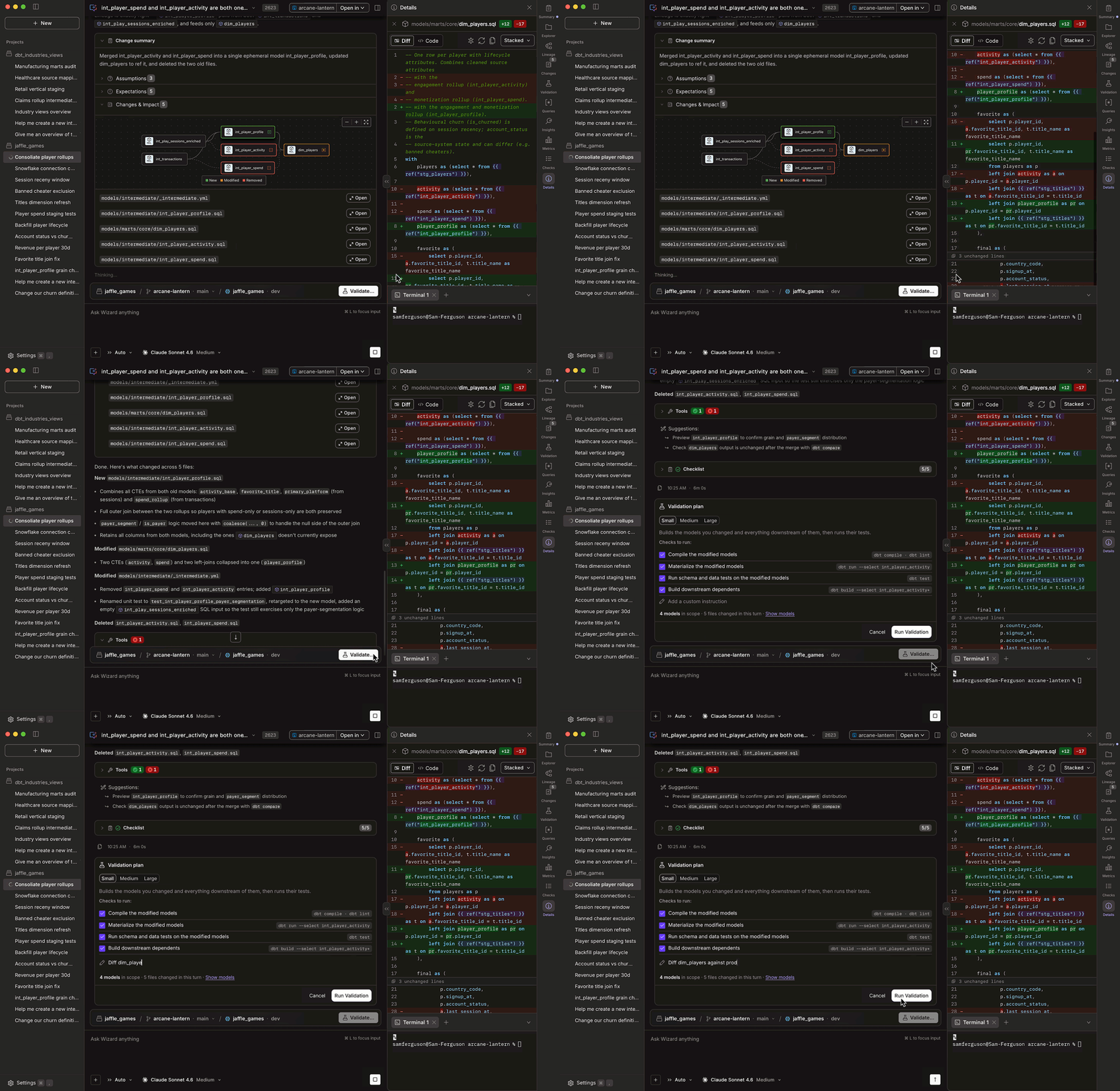
→ Download Wizard Desktop today
Coming soon to dbt Wizard
- Report artifacts in the dbt platform: Share what Wizard builds with the rest of your team.
- Third-party MCP connectors: Bring context from more of your tools into Wizard.
- Governance and cost controls: Set guardrails on how your team uses AI in dbt.
Level up for AI: dbt MCP and dbt Charts
Self-serve analytics is finally living up to its promise. AI agents and people are chatting with their data and building charts faster than you can say “dashboard.”
But more AI makes governance more important, not less. Without shared definitions, AI produces wrong answers and chart-slop faster, at greater scale. Your metrics have to mean the same thing everywhere: every BI tool, every agent, every warehouse.
The good news: that context already lives in dbt in your semantic definitions, lineage, and tests. And with dbt MCP listed in the Claude, ChatGPT, and now Databricks, and Cursor marketplaces, it’s one click away from the AI tools your team already uses. Official listings for Snowflake, Google Gemini, and AWS Kiro are on the way.
NEW: dbt Charts in Claude and ChatGPT (Beta)
Now you can chat with your dbt Charts boards and your warehouse right inside Claude or ChatGPT, using your own permissions. It works in the regular apps on web, desktop, and mobile, with nothing to install. The way dbt Charts works in Claude and ChatGPT is itself an MCP connection: you add one URL, dbtcharts.com/mcp, as a connector.
And because every board lives in your git repo, you own everything you build. You can now have self-serve analytics in Claude or ChatGPT with data-team control. In our benchmark testing, dbt Charts produced higher-quality dashboards while using roughly 20-50% fewer tokens than building them from scratch.
More from dbt Charts
- New design panel (Beta): Start with chat, polish by hand. Double-click text to retype it, select a chart to adjust its style, and every change updates the YAML.
- Custom charts (Beta): New in dbt Charts 0.10.0, custom charts are for the chart that isn't on the menu: any shape you need, while your boards stay consistent and reviewable.
- Migration importers: Moving off another BI tool usually means rebuilding every dashboard by hand. New in dbt Charts 0.11.1, you can bring your existing dashboards over from Looker, Sigma, Hex, and Omni instead.
Level up the platform: secure, governed, and self-serve
Model query history: GA for Amazon Redshift and Databricks
Track how your models are used over time, so you can find your most popular models and optimize your data products. Model query history in dbt Catalog now supports Amazon Redshift and Databricks, alongside Snowflake and BigQuery.
Self-serve PrivateLink (Public Beta)
With PrivateLink, traffic between dbt and your data platform stays within your network and never crosses the public internet. You can now set it up yourself, with no support ticket, for Amazon Redshift, Databricks, and Snowflake (AWS). Workspace-level Private Link for Microsoft Fabric is also now in Public Beta.
More platform updates
- External OAuth for the Semantic Layer on Amazon Redshift: Semantic Layer development connections to Redshift now support external OAuth with Okta or Microsoft Entra, using AWS IAM Identity Center.
- Custom GitHub application (Private Beta): Running GitHub Enterprise Server or GitHub with EU data residency? You can now register your own GitHub application and connect it to the dbt platform. Available on Enterprise and Enterprise+ plans only. → Docs
New dbt Learn courses
Level up your skills with new, free courses:
What's next
See it all in action
Book a demo of local unit tests, dbt State, Wizard Desktop, and dbt Charts.
Make your voice heard
The State of Analytics Engineering survey is now open. Your answers shape the next report, which helps data teams understand industry trends, advocate for resources, and plan for the year ahead. Take the survey today.
Have questions or feedback? Find us in #product-updates in the dbt Community Slack.
Get started in dbt
Join the analytics engineers building data infrastructure that actually scales.
Install dbt Wizard CLI
Get started with an agent purpose-built for analytics engineering. It knows which tool to call, which context to pull, and checks its own work before surfacing anything to you.