The dbt Developer Agent is now in Preview: the coding agent for analytics engineering


Every few years, the way we work with data evolves. We’ve gone from SQL editors to BI dashboards to conversational chat, and each shift moves data work forward. Now we’re entering a new phase defined by agents that can reason through tasks, plan, and act on their own.
But despite being remarkably good at general software engineering, today’s coding agents struggle on dbt projects, because the project itself is the context and the guardrails. Without that grounding, they write SQL that looks right but references a column that doesn't exist, breaks a dialect rule, or silently breaks tests, contracts, and governed definitions three models later. The result is SQL that's syntactically correct and semantically wrong. Analytics engineers need an agent built for the job, grounded in your dbt project from the start. With today's launch, that's finally possible.
The dbt Developer Agent is now available in Preview for dbt platform customers. It’s the next evolution of dbt Copilot, built directly in the Studio IDE, and it works across every file a change touches. That matters in analytics engineering, where the risk isn’t just a syntax error—it’s a change that slips past your project’s guardrails and breaks tests, contracts, or governed definitions downstream.
No new tools to install. No context switching. Nothing to set up. It ships with dbt Agent Skills and dbt's product docs toolset built in, so best practices and canonical answers are there while you build. Open dbt Studio to try it, or read the docs to learn more.
Agents that can think across your dbt project
When we launched dbt Copilot in 2024, we were solving a real but bounded problem. Writing boilerplate, drafting tests, documentation, and YAML configs by hand slows everyone down without making anything better. dbt Copilot made those workflows much faster.
But the thing that actually slows teams down isn't writing a model. It's what happens around the model. You rename a column and something three dashboards deep breaks. You add a metric and spend an hour chasing down every semantic definition and exposure that needs to move with it. You open a PR and realize the last person who touched this file left your company six months ago. None of that is a coding problem. It's a data problem, and addressing that problem requires an agent that understands your data.
During our beta, we spoke with dozens of customers, and kept hearing the same thing: they wanted an agent that actually knew their whole dbt project. One that could read the graph, understand the lineage, pick up on the contracts and the semantic definitions, and then make the change—without breaking the guardrails their teams depend on to keep data trustworthy. When something broke, they wanted it to troubleshoot the way a senior analytics engineer would: trace the failure, find the root cause, fix what's actually wrong instead of patching the symptom.
So we built it.
Meet the dbt Developer Agent
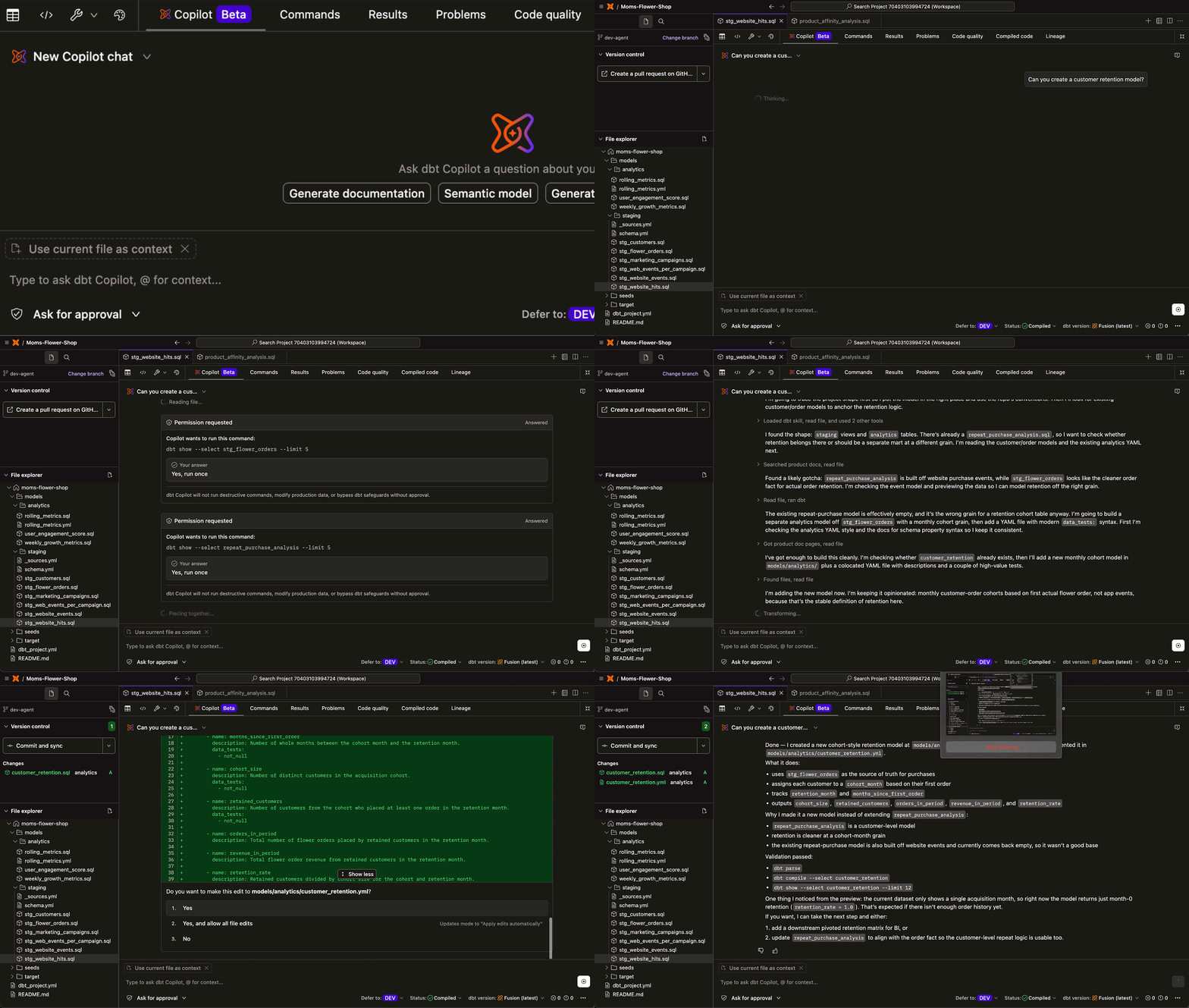
The dbt Developer Agent lives right in dbt Studio, so you see every change in context directly in the IDE, right alongside the code you’re changing. In the IDE you can describe the change you want to make—like renaming a model, updating a column, or adding a metric—and the agent will analyze your full dbt graph. Not just file dependencies, but lineage, contracts, semantic definitions, tests, and governance. Then the agent drafts edits across those files and shows them to you as a sequence of reviewable diffs. You approve or reject each step, so only the changes you accept are saved to your project.
“What really sets the dbt Developer Agent apart is its precision in identifying and resolving bottlenecks. It doesn't just suggest code; it understands our existing tests and lineage well enough to troubleshoot issues almost instantly. This has significantly reduced our build times and allowed us to scale our dbt project with total confidence in our data's trustworthiness. It’s the perfect balance of AI speed and strict architectural governance.” Vishal Kaviraj, AVP Data Architect
Grounded in your dbt project for faster, safer changes
What separates the dbt Developer Agent from coding agents built for software engineering is two things: context and governance. Context is what makes an agent good at analytics engineering. The more of your project an agent can see, the safer its changes. Governance is what makes those changes trustworthy at scale, the tests, contracts, semantic definitions, and review controls that your team already depends on.
Other agents built for data have pieces of that context. Warehouse-native agents read your schemas and write SQL within the warehouse they're built for. IDE-native agents (like Cursor, Claude Code) refactor across files and know your repo. Both are useful, and both are getting better every month. Some can even pull in pieces of your dbt project, but none of them are grounded in it.
A dbt project isn't just SQL. It's years of accumulated decisions about how your organization's data should be shaped, tested, owned, and understood. That's the context that decides whether a change is actually safe, and that context lives in dbt.
How it works
The dbt Developer Agent runs on a loop, not a single shot. You describe what you want. It drafts the edits. It proactively asks to run dbt compile or dbt build to validate its own work. You stay in control with the ability to approve or deny each command as it goes. It sees the result, adjusts if it needs to, and keeps going until the change is ready for your review.
it’s designed to help you move fast, but still work inside the same validation and review guardrails your data teams already trust.
It also works with Fusion out of the box. This gives the agent a fast, local, deterministic feedback loop so it can validate changes (like missing columns, dialect rules, and downstream breakage) without waiting on expensive warehouse round-trips.
A few things that make it great for developer workflows:
- It’s grounded in your whole project, not just the file you have open. The agent understands your full dbt graph. When it writes or refactors a model, it understands what’s upstream, what’s downstream, and what a change means for the rest of the project.
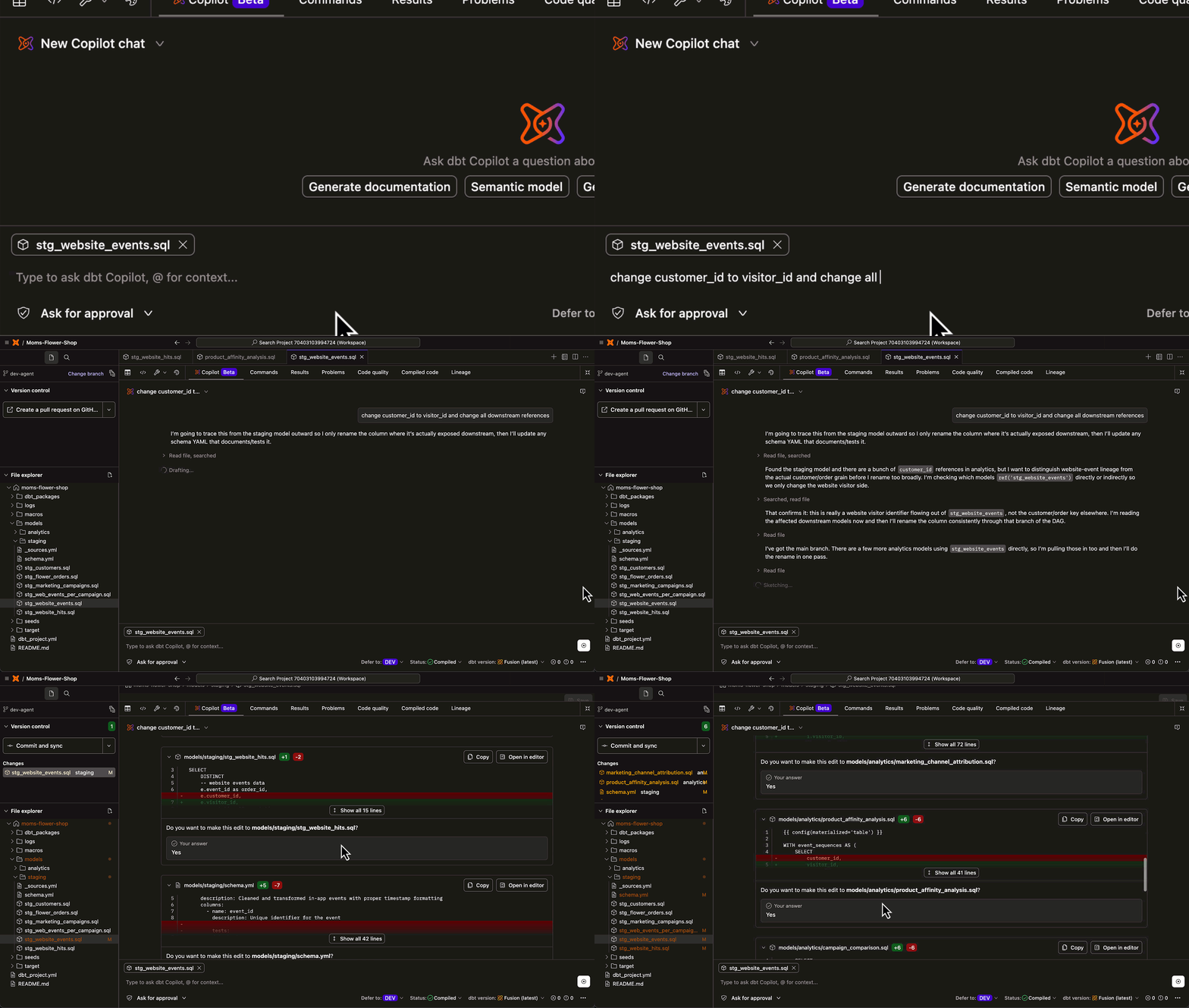
- It keeps related files in sync. A single prompt can produce coordinated changes across models, YAML configs, and documentation. If you rename a model, the refs follow. When you change a column, the downstream tests update with it.
- It ships with dbt Agent Skills. Earlier this year, we launched Agent Skills, built by dbt Labs and the dbt community, that encode a decade of analytics engineering best practices. It brings the kind of knowledge that usually only lives in a senior engineer’s head, now available out-of-the-box to the agent, without any configuration. It also offers support for project-level context skills, enabling the Developer Agent to seamlessly detect and prioritize custom markdown skills alongside dbt Labs-managed ones.
- It ships with dbt's product docs. So you can verify documented behavior and recommended patterns without leaving dbt Studio.
- It shows its work. You see the agent’s reasoning and tool calls as it works, not just the final output, so if it takes a wrong turn you can see exactly where and why. You can copy the suggestion or open it directly in the editor.
- It keeps a human in the loop. “Ask-for-approval” mode (the default) surfaces every edit as an inline diff before anything saves, while “edit-automatically” mode applies its work as it goes, with reasoning you can follow. You pick the right level of autonomy for the task, and nothing lands without your say.
- It validates as it goes. A built-in comparison loop catches problems before you see the final diff, so agent-generated changes meet a higher bar than "the code compiles."
- It runs commands on your behalf. Beyond just file edits, the agent can execute dbt commands, open pull requests, and handle the workflow steps around the change, not just the change itself. You approve each command before it executes, with options to allow it once for the session or deny it.
On trust and autonomy
We spent a lot of time thinking about how much autonomy a native dbt agent should have. The answer we landed on is that "it depends," and that the tool should support that flexibility rather than forcing a single workflow mode.
- “Ask-for-approval” mode (the default) surfaces everything for review before saving. You see inline diffs, approve what looks right, and push back on what doesn't. Nothing happens without your say.
- “Edit-files-automatically” mode writes and saves as it works, which can be right for tasks where your team has enough confidence in both the agent and the change to let it run.
Most teams will probably live somewhere between the two depending on the model, the stakes, and how familiar the work is.
What you can do with the Developer Agent today
The Developer Agent lives in the dbt Copilot panel in dbt Studio, so the whole loop of intent, change, validation, and review happens next to the code and lineage you're already working in. No context switching, no separate tool to learn.
Here are a few of the things it handles well today:
- Refactor across files. Describe the change, the agent reads your full graph, coordinates every file that needs to move, and surfaces the diffs for review. Rename a model and the refs follow. Restructure a mart and the downstream tests update
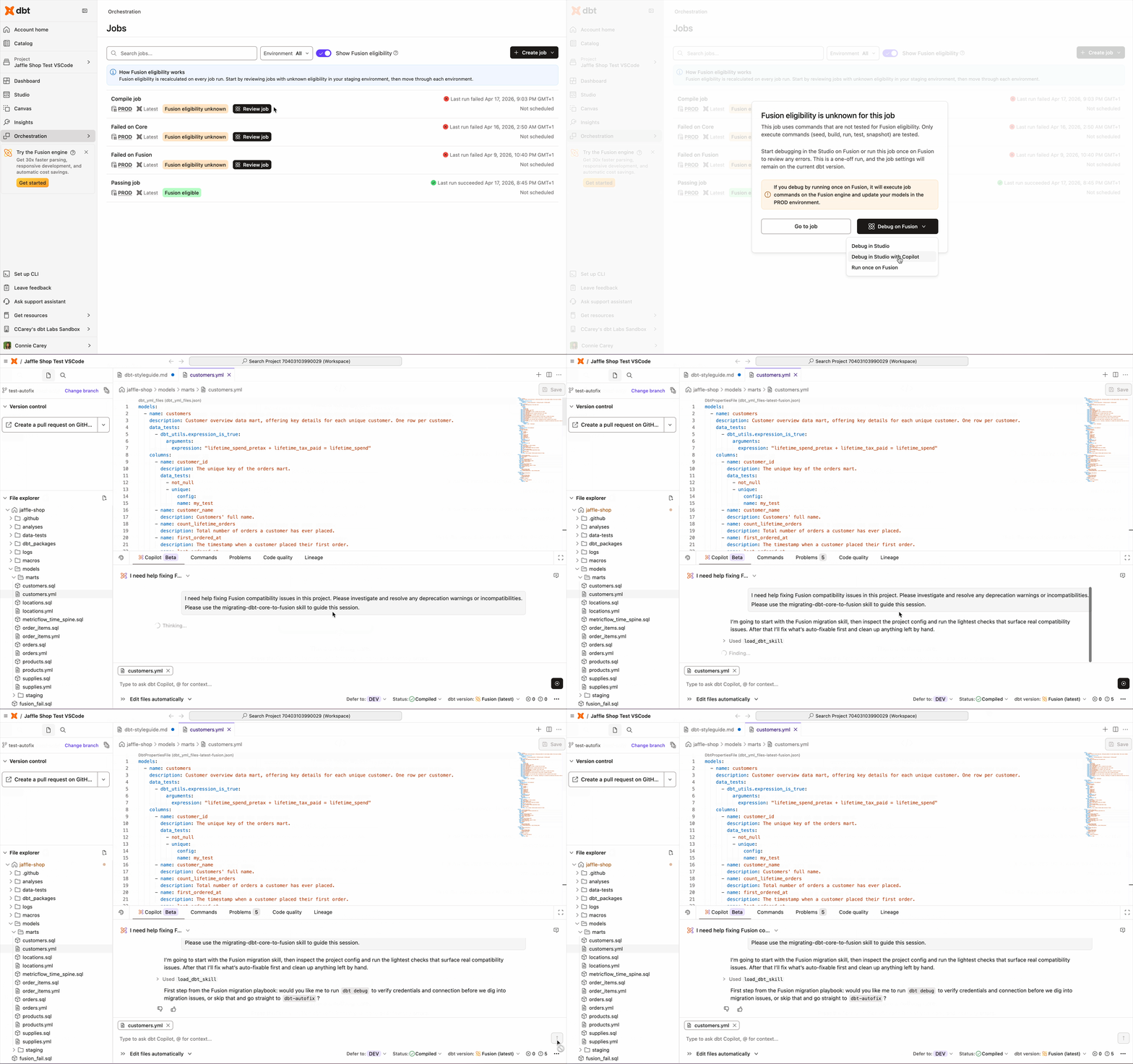
- Fusion migration. For teams with projects blocked on conformance failures between dbt Core and Fusion, the agent classifies what's fixable, applies high-confidence fixes automatically, and surfaces what needs your input or is blocked at the engine level.
- Update models. Describe a change in natural language and let the agent write or refactor the SQL, tests, and docs together, not separately.
- Enhance your semantic layer. Add or modify metrics and dimensions with full project context. The agent knows your existing definitions and builds consistently with them.
- Migrate stored procedures. Describe the logic you're moving off of and the agent translates it into dbt models, tests, and docs, with full awareness of where it fits in your existing graph.
- Create tests and docs. Generate test coverage and documentation for existing models in a single pass, grounded in how each model is actually used downstream.
- Work without breaking your flow. The Developer Agent lives in the Copilot panel, so you can stay in whatever file you're already editing and let the agent handle the related changes in the background. No switching to a chat tab to kick off work, then switching back to review it.
We went from about 60 conformance errors to 7, using the Fusion migration agent. That's the difference between too hard and actually doable." - Michael Fridolfsson, Data Architect, Brighte
What's next
This is just the beginning, and here are a few things we're actively building toward:
- Built-in data previews and data diffs to improve validation and help you review the outcomes of agent-generated changes before they hit production.
If your team works primarily in Claude Code or VS Code, the dbt MCP server brings the same structured project context to the agent you already use.
Get started
The Developer Agent is available in preview for dbt platform customers with dbt Copilot enabled. Simply open dbt Studio, find the dbt Copilot agent pane, and describe what you want to build or change. “Ask for approval” mode is a good place to start: review the diffs, approve what looks right, and let the agent handle the rest.
Not on the dbt platform yet? Talk to our team to learn more.
Get started in dbt
Join the analytics engineers building data infrastructure that actually scales.
Install dbt Wizard CLI
Get started with an agent purpose-built for analytics engineering. It knows which tool to call, which context to pull, and checks its own work before surfacing anything to you.


